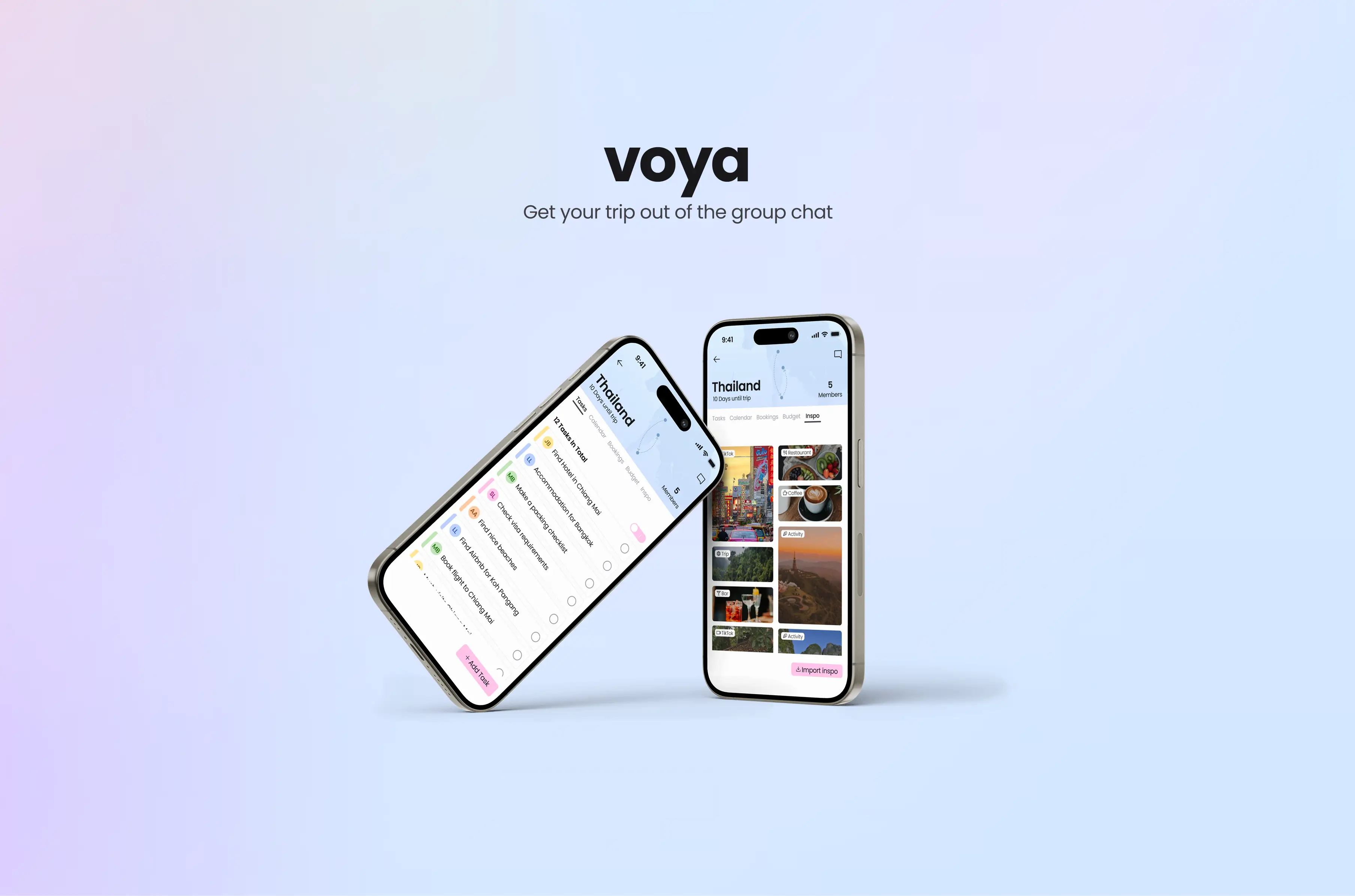
Voya - An app that simplifies travel planning for friend groups.(In progress)
Project Type
Passion ProjectResponsibilities
User ResearchUI Design
Prototyping
Visual Design
Deliverables
Design SystemPrototype
Duration
1 monthTraveling is fun, right?
The struggles of planning a group trip
TikTok is where I often look for travel inspiration, and I kept seeing videos joking about how uncommon it is for a group trip to "actually" make it out of the chat. As someone who travels often, that caught my attention. I wanted to understand the real challenges behind group trip planning and why so many plans fall apart. Through online forum research, conversations with friends, and a few short interviews, I discovered that the biggest challenges aren't choosing a destination or picking dates — but everything that comes after.
The Problem
Planning a trip sounds exciting, but many groups struggle to turn their ideas into an organized plan. My research surfaced four key pain points: 1. Uneven responsibility and overwhelm Groups often struggle to divide tasks fairly. One or two people usually take the lead, which leaves them overwhelmed and unsure of what others have finished or forgotten. 2. Scattered information and missing documents Important booking details get lost in the chat. People don't know who has which reservation or where anything is stored. Users want a shared space where everyone can access the same information. 3. Slow decision-making Quick decisions are difficult in group chats. Conversations become long, repetitive, and scattered, which drains time and energy and slows progress. 4. Budget conversations are uncomfortable Budget is a sensitive topic. People have different priorities and sometimes they aviod the topic of deciding a budget beforehand which builds up for discussions in the future. It's also hard to keep track of who paid for what and whether everyone is staying within the agreed budget.
The process
After doing my first research as well as taking those insights and forming my four key user problems I did following steps I made and methods working towards my goal:
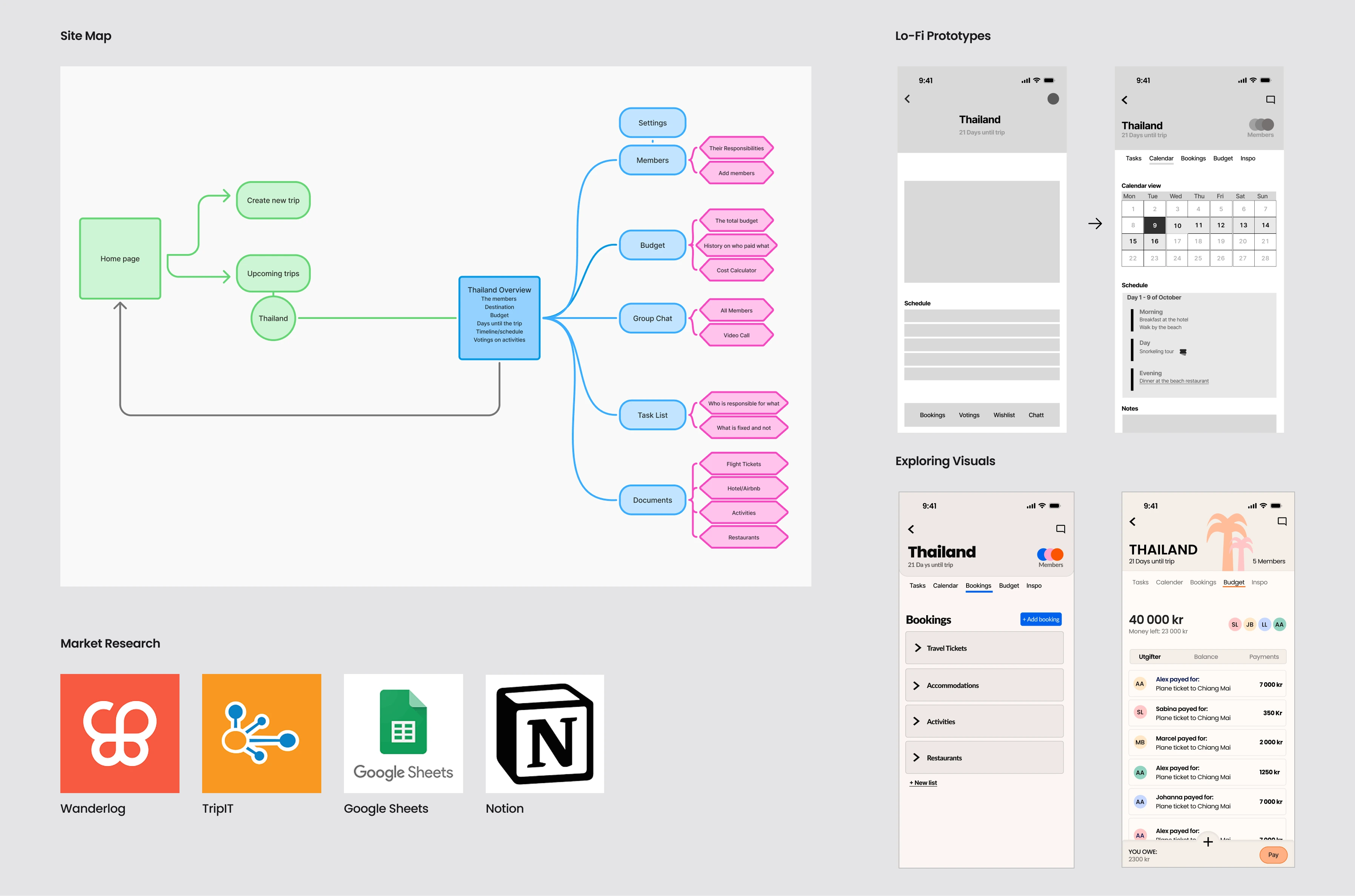
Market Research
I reviewed existing tools to understand what users value and what's missing. Wanderlog is popular for organising trip details, but users want a clearer calendar view and often feel overwhelmed by its many features. TripIt offers structure but feels outdated. Others use Notion in combination with Google Sheets, but these lack structured collaboration, leaving one person to act as the “project manager” to keep everything organised.
From Insights to Flow
Based on my insights, I explored possible user flows and created a site map focusing on the pages needed to address the core user struggles. To design with a clear direction, I also wrote a short user scenario about my friends and me planning a trip to Thailand. This helped me understand how different users might move through the flow.
Sketching & Iteration
Early in the design stage, I sketched multiple alternatives using the Crazy 8s method, which helps me avoid getting stuck in details. These sketches guided the first draft of my main screens. I tested the flow, gathered feedback, and iterated based on what didn't work.
Choosing a Visual Direction
After finalising my low-fi screens, I began the visual design process. I evaluated what I liked and disliked in competitor apps, created moodboards, and explored different visual directions. Through several iterations, I chose a style that felt both playful and structured — the balance I was aiming for.
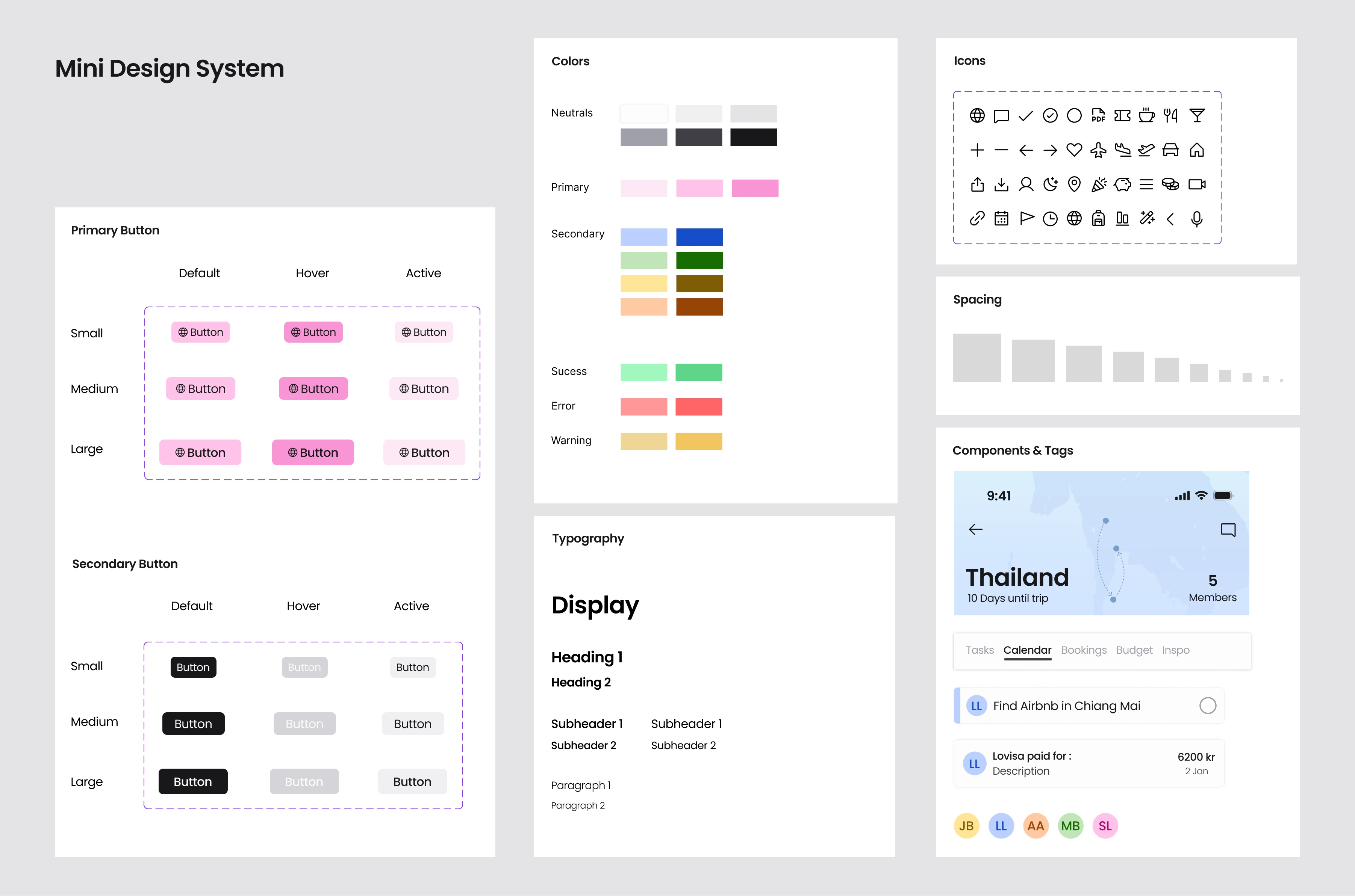
Design System
I used this project as a chance to explore design systems in practice. By creating a mini design system, I ensured the UI remained cohesive and consistent across the app.
Voya
The solution I created became Voya. An app designed to help groups members stay organized before a trip. It allows them to keep track of tasks, divide responsibilities, simplify decision-making, and gather all important information in one place for easy access by everyone involved. Below, I walk through my reasoning and how I addressed each user problem.
1. Simple task sharing
The first user problem was that some group members had to take the leader role, which made them overwhelmed with tasks or responsible for gathering all the information from others. As a solution, Voya uses a task tracker where you can create and divide tasks between members. Each member is given a color and initials so you know who is who, making it easier to see who has many tasks left and who doesn't. You can view all tasks or only your personal tasks. When someone completes a task, they simply check the box and the others are notified.
Adding task
When creating a task, you can assign it to a group member and set a deadline if needed. The tasks in the list are sorted with the most urgent at the top. Everyone can see who assigned a task to whom.
2. All details in one place
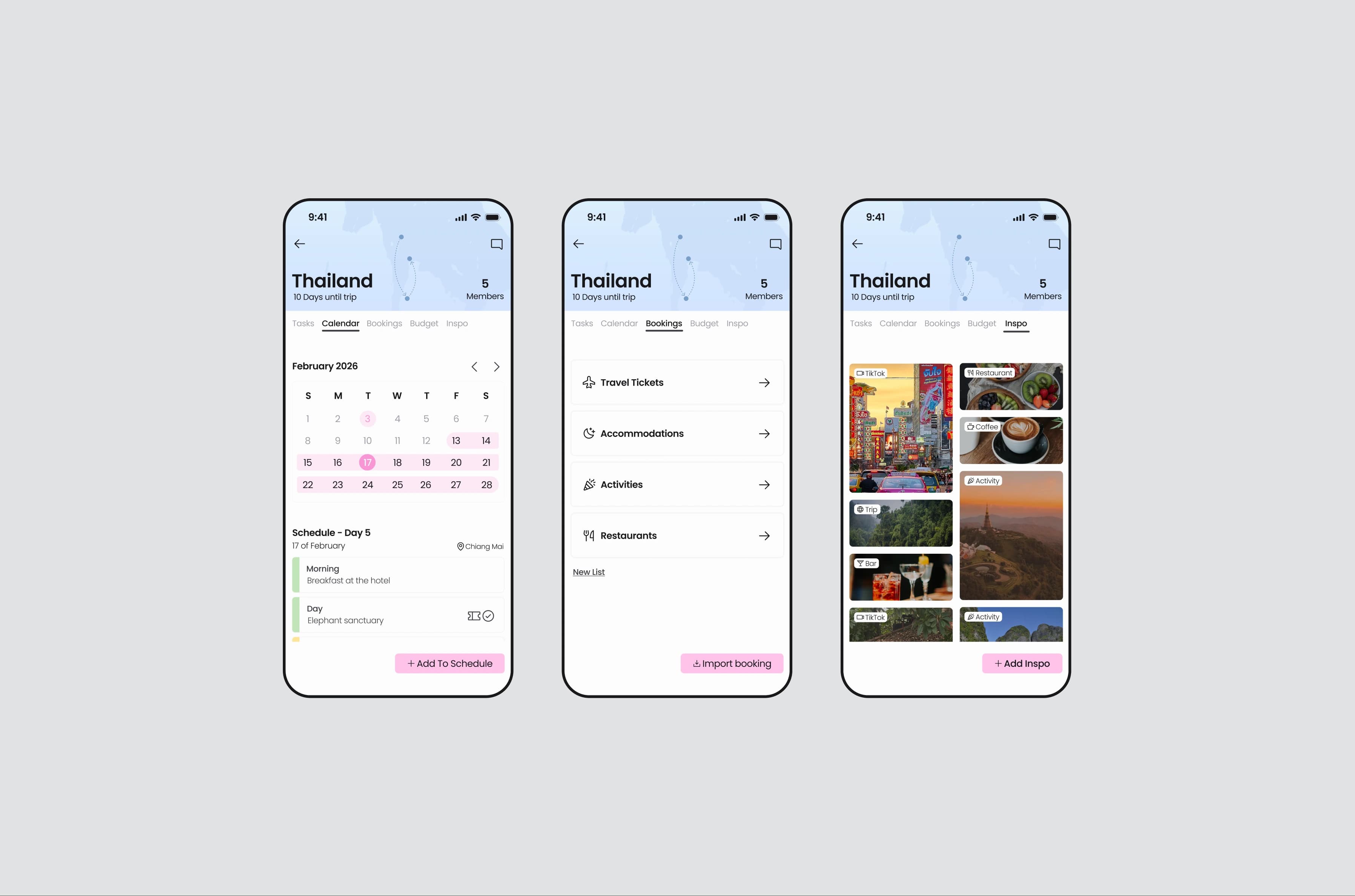
It seems like a shared space for important trip information was missing. Voya is designed so all group members can access everything related to the trip. In the calendar screen, you can see an overview of the trip, as well as everything that’s booked or planned for specific days in the schedule section below. You get information about where you will be, details about the accommodation, pre-booked events, and access to tickets. If you have trouble finding a specific ticket or booking reference, you can look in the Bookings section, where all necessary documents are collected.
Business Opportunity
I also added an inspo screen. This is because I find 90% of my trip inspiration through social media like TikTok, and even if I save videos in the app, the travel content quickly gets lost among everything else I've saved. The inspiration page lets friends share videos and links from different platforms about the destination. From a business perspective, this section could also become a natural revenue stream. Since users browse destination-specific inspiration here, the app could display relevant recommendations or targeted ads for experiences, activities, and services connected to their trip.
3. Easy decision-making
To make decisions simpler and faster, I added a voting feature in the calendar screen. In the schedule, events are color-coordinated: green for confirmed/booked activities and yellow for suggestions. In my use case, one of the group members suggests a restaurant she wants to visit and asks the others if that works for them. To vote, you simply press yes or no, and the majority decides. This removes long discussions in the chat and helps the group agree quickly.
4. Smarter group budgeting
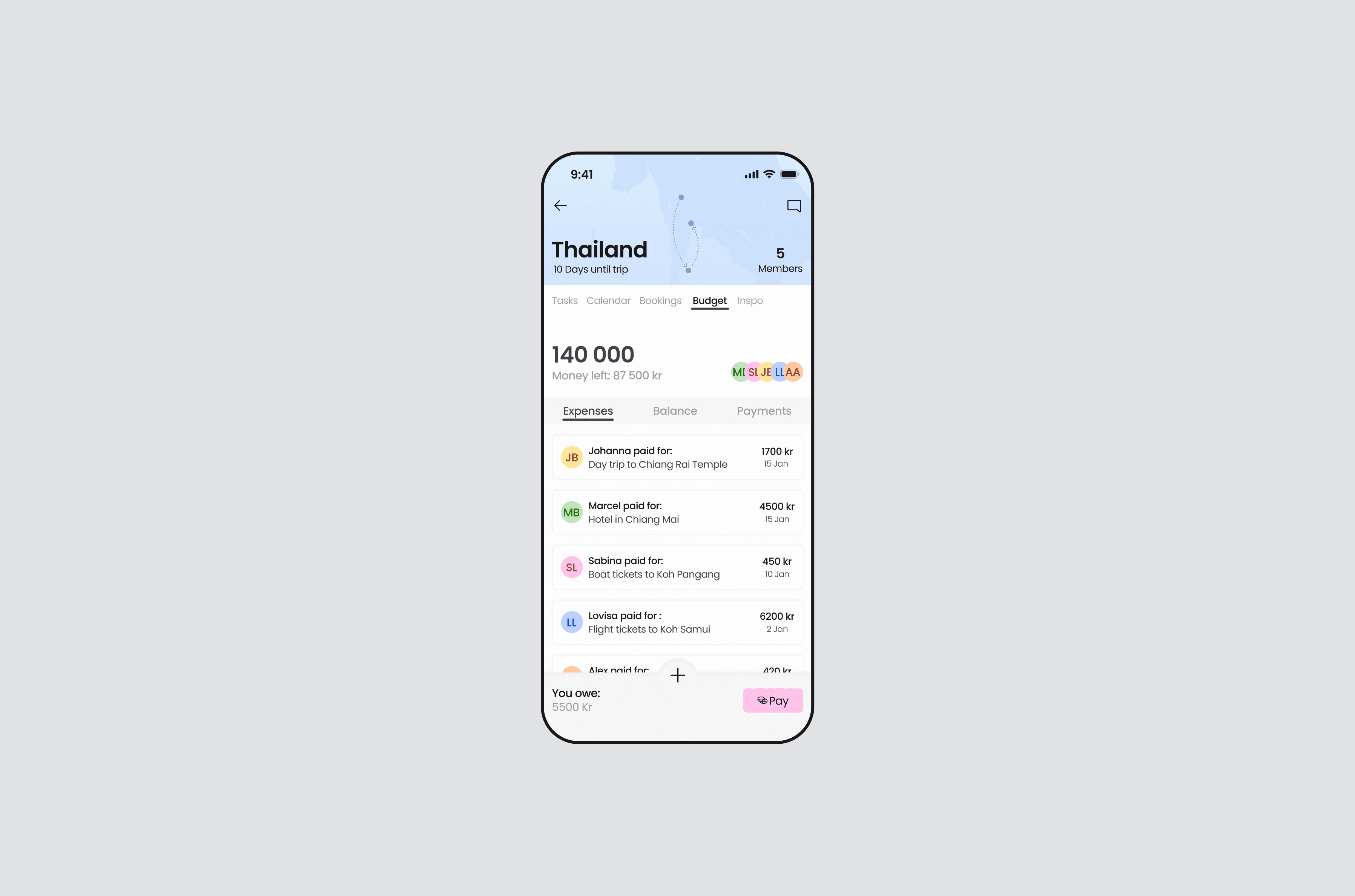
To make budgeting easier and less uncomfortable, Voya requires the group to set an estimated budget when creating a trip. How the group decides this amount is up to them, but the app encourages the conversation early, preventing misunderstandings later on. In the budget screen, users can log whenever they've paid for something. Voya keeps track of who covered which expense and calculates who owes money to whom. It also shows how much of the estimated budget has been spent so far, helping the group stay aware and avoid overspending.